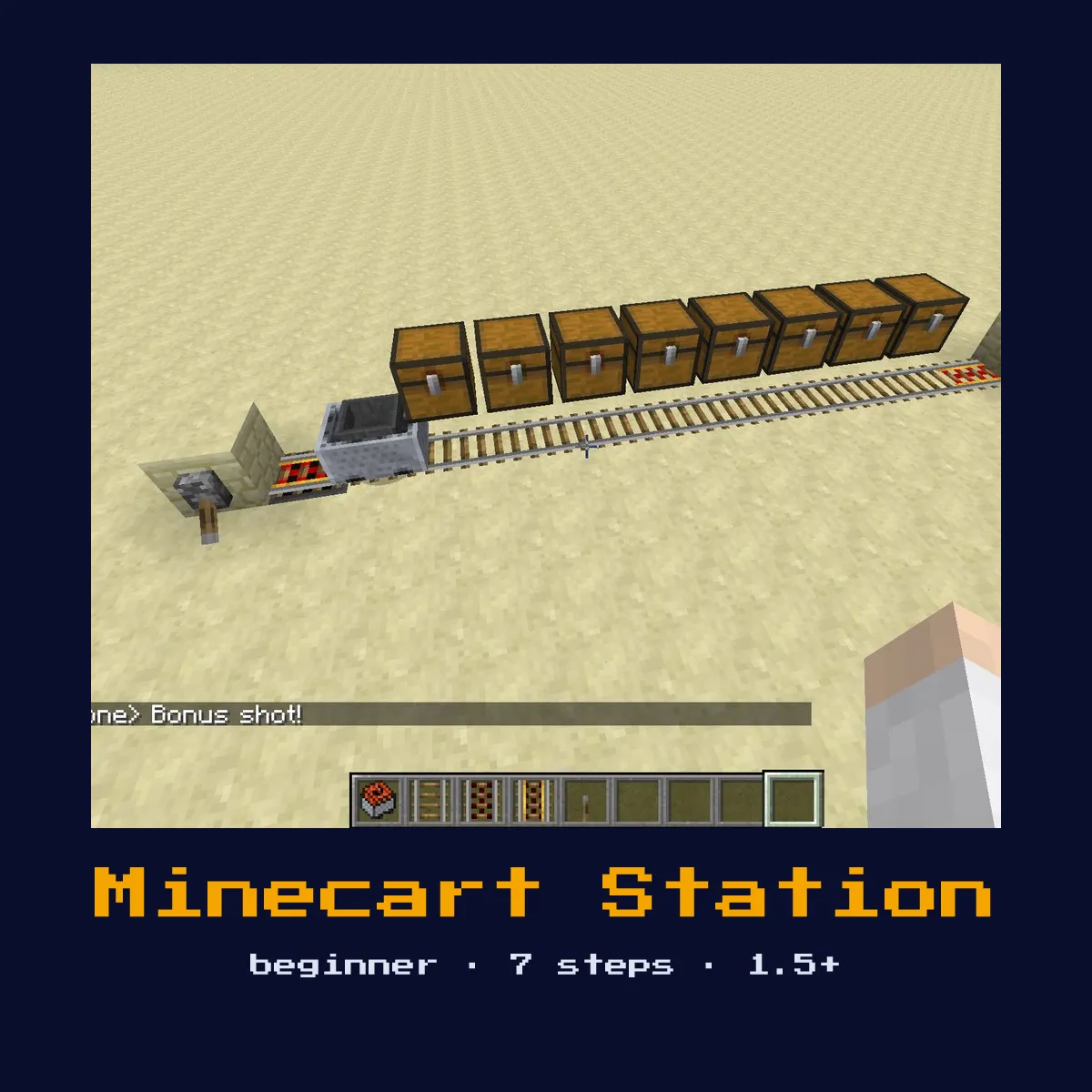
MINECART STATION
A proper minecart station with arrival detection, automatic braking, and button-activated departure. The detector rail senses arriving carts and brakes them at the station.

Materials List
Minecart Station materials, and what they cost to craft
Craft every part of a Minecart Station yourself and you spend 26 ingredients, of which 12 Iron Ingot, 6 Gold Ingot and 3 Redstone, plus 3 smaller entries.
The Minecart Station leans on Powered Rail, Detector Rail and Redstone Torch, and every one of them is covered in full on its own component page.
| Goes into Minecart Station | Count in one Minecart Station | Price of a single one |
|---|---|---|
 Powered Rail Powered Rail | 4 | 6 Gold Ingot, 1 Redstone, 1 Stick for 6 |
 Detector Rail Detector Rail | 1 | 6 Iron Ingot, 1 Redstone, 1 Stone Pressure Plate for 6 |
 Rail Rail | 10 | 6 Iron Ingot, 1 Stick for 16 |
 Redstone Torch Redstone Torch | 1 | 1 Redstone, 1 Stick |
 Stone Button Stone Button | 1 | 1 Stone |
Minecart Station written out in raw ingredients
 12 Iron Ingot
 6 Gold Ingot
 3 Redstone
 3 Stick
 1 Stone
 1 Stone Pressure Plate
Every Minecart Station figure in this table is read off the Java Edition 26.2 recipes.
Minecart Station, in one place: what it is and what it does
A proper minecart station with arrival detection, automatic braking, and button-activated departure. The detector rail senses arriving carts and brakes them at the station.
As a transport build it carries the player, mobs, or items from one place to another using pistons, rails, or slime-block motion. It is a beginner-friendly build: the wiring is forgiving and a first-time redstoner can finish it in one sitting.
Clear a space of 3W x 8L x 2H for the Minecart Station. Any version of Minecraft from 1.5+ up to and including 26.2 will run it as described.
How the Minecart Station works: the redstone mechanics
An unpowered powered rail at the stop point brakes an arriving cart to a halt, a detector rail just before it senses the arrival, and powered rails on either side launch the cart when a button is pressed. On open track a booster rail roughly every 38 blocks keeps loaded carts at speed.
Strip the Minecart Station back to what actually moves and what is left is powered Rail, detector Rail, rail, redstone Torch, and stone Button; all the rest of the 6 material types is scaffolding built around those.
Because it moves things through the world, its reliability comes down to consistent piston or rail timing, one mistimed stage strands the rider or cargo.
How to build the Minecart Station
- 1Build the station platform with a straight rail section.
- 2Place an unpowered powered rail at the stop point (this brakes incoming carts).
- 3Place powered rails before and after for departure acceleration.
- 4Place a detector rail before the station to detect arrivals.
- 5Connect a button to the departure powered rails (press to launch).
- 6Optionally add a hopper under the station to collect items from hopper minecarts.
- 7Connect stations with regular rail lines, adding powered rails every 38 blocks.
What the Minecart Station is used for
- ▸As a transport build it carries the player, mobs, or items from one place to another using pistons, rails, or slime-block motion.
- ▸Reckon on 4× powered Rail, 1× detector Rail, 10× rail, and 1× redstone Torch before you start digging. For a beginner project that is still a fairly short shopping list to put together.
- ▸Chain it between floors or bases to move quickly without ladders or long stairwells.
- ▸Add an automatic trigger at each end so it dispatches without a manual press.
Tips & common mistakes
- !Leave the stop rail unpowered so it acts as a brake; powering it by mistake makes the cart accelerate straight through the station.
- !Test the full cycle of the Minecart Station in a creative-mode copy first, then rebuild it in survival once you know the timing holds.
Minecart Station, frequently asked questions
How do you build a Minecart Station in Minecraft?
Build the station platform with a straight rail section. Place an unpowered powered rail at the stop point (this brakes incoming carts). The full build takes 6 material types and fits in about 3W x 8L x 2H.

What materials does a Minecart Station need?
The main materials are 4× powered Rail, 1× detector Rail, 10× rail, and 1× redstone Torch, plus the remaining structural and wiring blocks.
How hard is the Minecart Station to build?
It is a beginner-friendly build: the wiring is forgiving and a first-time redstoner can finish it in one sitting. It is compatible with Minecraft 1.5+ and later.
How does the Minecart Station actually work?
An unpowered powered rail at the stop point brakes an arriving cart to a halt, a detector rail just before it senses the arrival, and powered rails on either side launch the cart when a button is pressed. On open track a booster rail roughly every 38 blocks keeps loaded carts at speed.
Builds that share parts with Minecart Station
Minecart Station does not stand on its own. 5 other contraption pages are tied to it: